HV World / HV Reset
HV Reset
Plan your day. See your progress.
Plan your day, do one task at a time, and see what you really did. Your own dashboard shows where your time goes and whether you're getting better.
The problem
“Where did my day go?”
Busy all day, but you can't say what got done. Plans slip, and you never really know if you're improving.
What HV Reset does
Plan it. Do it. See it.
HV Reset shows one task at a time and moves your day when you're late. Then your dashboard shows the real picture: time spent, focus, what started on time, and your progress week after week.
See it in Riya's storyThe dashboard
Your personal dashboard
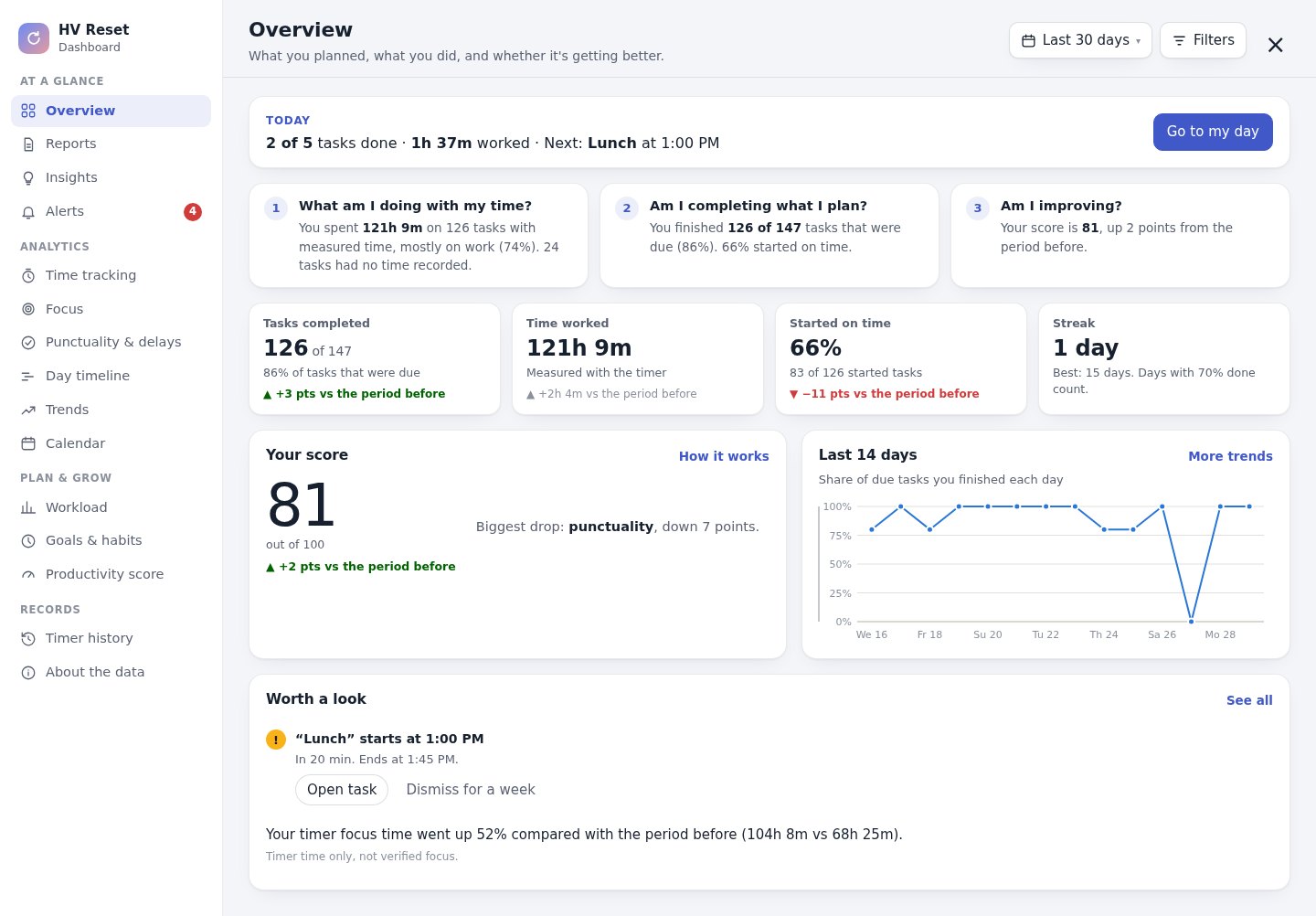
See what you planned, what you really did, and whether you're getting better. Every number comes from what you actually do. Nothing is made up.
 1234567
- 1Today at a glanceTasks done, time worked and what's next, with one tap back to your day.
- 2Three honest answersWhat am I doing with my time? Am I completing what I plan? Am I improving?
- 3Four numbers that matterTasks completed, time worked, started on time and your streak, each compared with last time.
- 4A fair productivity scoreOne score from six parts you can see and adjust. Longer hours never count as better.
- 5Your last 14 daysA simple trend of how much of your plan you finished each day.
- 6Worth a lookOne timely alert and one tip from your own patterns, never judgement.
- 715 deeper viewsTime, focus, punctuality, calendar, goals, reports and more, one tap away.
How it works
Three steps. That's it.
Make your plan
Add tasks with a time, pick a ready plan, or just tell HV AI how your day looks.
Press Start
The clock shows what's on now. Pause when you step away. Running late? One tap moves the rest of the day.
See your progress
Your dashboard shows your time, focus, streaks and score, with tips from your own patterns.
Full tutorial
Learn HV Reset in 12 minutes.
A step-by-step guide: plan your day, focus on one task at a time, and read your dashboard. Watch it once and you'll know everything.
Every feature
Everything HV Reset does.
One task at a time
Only the task in front of you, with the time left and what's up next.
Focus clock with pause
A calm countdown for each task. Pause when you step away, and the time waits for you.
Running late? Shift the day
Start late or early and one tap moves the rest of your day. Nothing gets lost.
Your personal dashboard
Time worked, focus, punctuality and streaks at a glance. Tap any number to see the tasks behind it.
A score that's fair
One productivity score built from six parts you can see and adjust. Longer hours don't count as better.
Where your time really goes
Planned vs actual time for every task, a 24-hour timeline, and which tasks always take longer.
Streaks, goals and habits
Set your own goals, track habits and beat your personal records.
Tips from your own patterns
“You finish most tasks between 9 and 12.” Plain insights and gentle alerts, never judgement.
Daily, weekly and monthly reports
What you did, what's left and what needs attention, ready to copy and share.
Music that follows the day
Soft ambient sound for morning, day focus, evening and night, based on the time of day.
HV AI plans your day
“Kal subah 6 baje gym, 10 se 1 padhai, shaam 7 baje family time.” It builds the plan and keeps your exact times.
Better with HV Vault
Use HV Vault too? Sign in to both with the same Google account and your follow-ups due and weekly numbers show up next to your day.
Who it's for
Made for every walk of life.
FAQ
Questions about HV Reset.
Do I have to plan every task myself?
No. Pick a ready plan and change it, or tell HV AI your day in one sentence and it builds the plan.
What happens if I fall behind?
Tap to shift the rest of the day, pause the task, move it to tomorrow, or do a shorter version.
What does the dashboard show?
Your time, focus, punctuality, streaks, a productivity score, trends, a calendar heatmap, goals and habits, and daily, weekly and monthly reports. Every number comes from what you really did, and nothing is made up.
Do I need an account?
No. Try it freely. Sign in with Google to save your plan, keep your dashboard history, and use it on phone and laptop.
Does it work with HV Vault?
Yes, if you use both. HV Reset works fully on its own. If you also use HV Vault with the same Google account, HV Reset shows your follow-ups due and this week's numbers from it, and HV AI knows about them.
Who can use it?
Everyone. It's free for everyone, HV AI included, and runs right in your browser.
The rest of HV World